Free · No signup · Runs in your browser

Find the tight week before it arrives.

Set four numbers, add a decision like a hire or a late client, and watch 26 weeks of cash redraw. A minute or less. Free, and nothing you type leaves your browser.

Weeks of cash
—
Cost of this decision
—
Current path
With your decision
Below your cash floor

What are you deciding?

Tap any of these and watch the dashed line move. What each one assumes appears below the list.

Your numbers

Currency
$60,000
$11,500
$9,000
$28,000

Cash out per week should already include your fixed costs. Fixed costs only set the floor.

How this is calculated

Each week: balance = last week's balance + cash in - cash out. The chart shows 26 weeks.

Cash floor: two months of the monthly fixed costs you entered. Fixed costs are assumed to be inside "cash out per week" already; here they only set the floor.

Weeks of cash: the week the balance reaches zero, to one decimal. If it does not reach zero in 26 weeks, the pace of the last four weeks is carried forward. If cash is not falling, the gauge shows ∞ (and anything beyond a year is shown as 52+).

Weeks below the floor: how many of the 26 projected weeks end under the floor.

The decisions: Hire: 5,000 a month from week 4. Revenue drops 30%: cash in is 30% lower from week 1. Buy 20k inventory: one payment of 20,000 in week 2. Top client pays a month late: 45% of cash in for weeks 1 to 4 arrives in weeks 5 to 8. Collect 10 days faster: about 10 days of cash in arrives once, in week 1. Raise prices 15%: cash in is 15% higher from week 5 (invoices already sent keep the old price; no customers lost).

What this is not: a forecast of your business. It extends the numbers you type. The full workbook builds the 13 weeks line by line. Read the method.

Runs in your browser. Nothing you type is sent anywhere. A planning tool, not advice.

Prefer a person beside you? Ask for a free 15-minute call

Want this on your own numbers?Ask for a free 15-minute call

  • Runs in your browser
  • No signup
  • 26 weeks, 6 decisions
  • A workbook, not an AI agent.

A fine dashboard can hide a bad week

This made-up business ships inside the workbook. Its dashboard says OK. Its 13-week line says otherwise: a client pays late in week 3, a tax payment lands in week 6, and cash drops under the safety floor and stays there to week 13.

Example business

What the dashboard says

33.3weeks

OK - over 16 weeks of oxygen.

What the 13-week line says

36,550low point

Week 13, 13,450 under the floor

  1. Week 3

    A client pays 3,000 instead of 7,000. The missing 4,000 arrives in week 7.

  2. Week 6

    An 8,500 tax payment takes cash from 50,250 to 40,600, under the 50,000 floor.

  3. Week 13

    The low point, 36,550. Nothing went wrong. Two ordinary things happened close together.

Example business
35k45k55k65kW0W1W2W3W4W5W6W7W8W9W10W11W12W13Floor 50,000W3W6W13 · 36,55035k45k55k65kW0W3W6W9W12Floor 50,000W3W6W13 · 36,550

Fig 1. Example business: the 13 weeks

See the full example and test a hire

The workbook

The workbook, opened up

A START HERE guide plus six working tabs. Open it in the spreadsheet app you already use.

Example business
12

Your first 15 minutes

Explains the six tabs, the five-step Friday routine, the one rule (set your cash floor before you build the forecast) and the colour code: yellow cells are yours, grey and green calculate.

  1. Yellow cells are yours.
  2. Set your floor first.
Example business

Your weeks of cash

Type four things: cash in the bank today, money customers owe you, money you owe, monthly fixed costs. It shows weeks of cash from your 13-week forecast, how long you would last if sales stopped tomorrow, your minimum cash floor, and your lowest point with the week it falls in.

  1. 33.3 weeks of cash, read from the 13-week forecast.
  2. Cash floor 50,000: two months of fixed costs.
  3. Low point 36,550 in week 13: what the OK hides.
Example business

Thirteen weeks of cash in and out

Cash in and out by category: collections, payroll, suppliers, rent, software, taxes, debt. The direct method lists real cash in the week it moves, not accounting adjustments, so you can see which week gets tight. Ending cash rolls forward and the week cash first hits zero is shown.

  1. Week 3 collects 3,000, not 7,000.
  2. Week 6: tax 8,500, ending cash 40,600.
  3. Ending cash 36,550 in week 13, 13,450 under the floor.
Example business

What you planned vs what happened

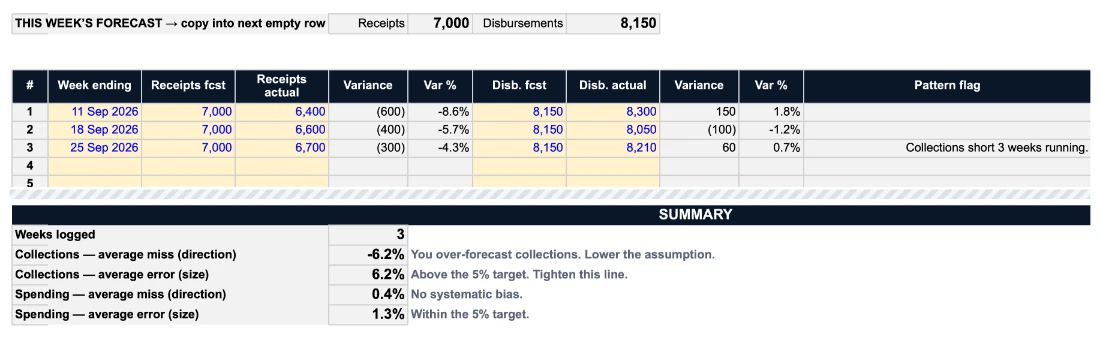
Each Friday, log what actually came in and went out. When a line misses in the same direction three weeks running, it says so, for example "Collections short 3 weeks running."

  1. Flag: collections short 3 weeks running.
  2. Forecast 7,000; actual 6,400, 6,600, 6,700.
Example business

How many days your cash is tied up

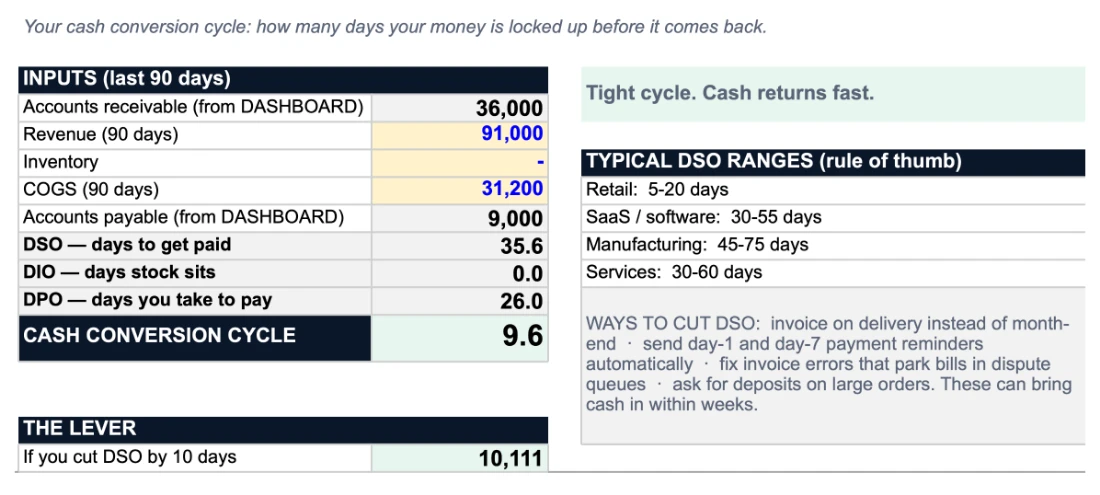
Days to get paid, days stock sits and days you take to pay, set against typical ranges, plus your cash conversion cycle. In the example, collecting 10 days faster releases about 10,100.

  1. 35.6 days to get paid.
  2. Cash conversion cycle 9.6 days.
  3. Collecting 10 days faster releases about 10,100.
Example business

Test a decision before you make it

Base, bear and bull cases built from your own forecast. Type a new monthly cost. In the example, a 5,000 a month hire takes 33.3 weeks to 20.3, and to 10.9 in a bad quarter.

Shown with 5,000 typed into the new monthly commitment cells. The file ships with zero there.

  1. Base case 20.3 weeks with a 5,000 a month hire.
  2. Bear case 10.9 weeks: TIGHT.
  3. Type one number: the new monthly commitment.
Example business

Three prompts with your numbers in them

One for before money moves, one stress test, one variance review. The formulas do the arithmetic; an assistant you choose can explain the result. Copy a prompt into ChatGPT, Claude or Gemini. Nothing is sent unless you paste it yourself.

  1. Three prompts, already filled with the example numbers.
  2. Nothing is sent unless you paste it yourself.
Look inside (PDF)See each tabUS$149 once, no subscription. See the price

From a quick test to a 15-minute Friday

  1. 1 min

    Try it

    Move four sliders. Tap a decision. See the week the line crosses your cash floor.

    Open the simulator
  2. 10 min

    Build your first 13 weeks

    Open the free starter. Type your cash today, then what you expect in and out each week. Read two cells: weeks of cash and the week of your lowest point.

    Get the free starter
  3. 15 min

    Keep it honest

    The full workbook adds the weekly log, the hire and bad-quarter tests and the working-capital view. Type your real bank balance, log last week, read the flags, roll forward.

    See the workbook

More free tools: When will I actually get paid?, the Friday kit and the cash runway calculator.

Free, no time limit

Get the free 13-week starter

One 13-week tab. A standard .xlsx file, checked in Apple Numbers. Not yet checked in Excel or Google Sheets. It opens with an example business already filled in, so you can see the week its cash drops under the floor before you type a number. It shows your runway in weeks and the week your cash is lowest.

Download the starter (no email)
  • A 13-week cash line with the week your cash is lowest
  • Your runway in weeks
  • No account, no bank login

Want the full system instead? See what is inside.

Get the starter and the Friday routine by email

First you'll get an email asking you to confirm your address. The starter arrives as soon as you click the link inside.

Verify, do not trust.

=IF('13-WEEK DIRECT'!C5<=0,0,IF(COUNT('13-WEEK DIRECT'!C27:O27)>0,MIN('13-WEEK DIRECT'!C27:O27),IF(AVERAGE('13-WEEK DIRECT'!C22:O22)>=0,"52+",IF(13+'13-WEEK DIRECT'!O23/(-AVERAGE('13-WEEK DIRECT'!C22:O22))>52,"52+",13+'13-WEEK DIRECT'!O23/(-AVERAGE('13-WEEK DIRECT'!C22:O22))))))
Six cells of the DASHBOARD tab. Example business, made-up numbers.
CellValueFormula
Weeks of cash left=IF('13-WEEK DIRECT'!C5<=0,0,IF(COUNT('13-WEEK DIRECT'!C27:O27)>0,MIN('13-WEEK DIRECT'!C27:O27),IF(AVERAGE('13-WEEK DIRECT'!C22:O22)>=0,"52+",IF(13+'13-WEEK DIRECT'!O23/(-AVERAGE('13-WEEK DIRECT'!C22:O22))>52,"52+",13+'13-WEEK DIRECT'!O23/(-AVERAGE('13-WEEK DIRECT'!C22:O22))))))
If sales stopped tomorrow=IF(C18<=0,"-",(C13+C14-C15)/C18)
Your floor=C16*F9
Cash above/below floor=C13-F10
13-week low point='13-WEEK DIRECT'!C24
Week of the low point=IF(F16='13-WEEK DIRECT'!C5,"Today","W"&MATCH(F16,'13-WEEK DIRECT'!C23:O23,0))

Move over a value, or focus it, and the formula bar shows the exact formula in the file you would download.

  • The simulator runs in your browser and sends nothing.
  • The workbook is a file on your computer. We never ask for a bank login.
  • We keep your email address if you sign up, and your order details if you buy. See the privacy policy.

The simulator works before you give us anything: move the sliders and read the maths in “How this is calculated”.

  • 324

    formulas you can read

    See the tabsIn a plain .xlsx file. Tabs are protected without a password: unprotect one to read any formula.
  • .xlsx

    plain file, no macros

    How it is checkedNo code runs in the file. It is a plain spreadsheet that opens in the app you already use.
  • 0

    accounts, no bank login

    What stays with youYou type your numbers into a file on your computer. This site loads its fonts, pictures and scripts from itself and sets no cookies.

Fit

Who it is for, and who it is not

It is for

  • Businesses that invoice and wait to be paid, or pay for stock before it sells.
  • The owner decides hires, stock orders and spending.
  • Roughly 1 to 30 people. The numbers are inputs, so size does not matter much.
  • You will give it 15 minutes on a Friday.

It is not for

  • Businesses paid at the till (cafés, salons, most retail).
  • Pre-revenue startups living on investor money: that is a different runway question.
  • Anyone who wants a bank feed or a tool that updates itself.
  • Tax advice or bookkeeping. This is planning.
  • A business already in acute insolvency trouble: talk to a lawyer or an insolvency adviser first.

Seven questions to ask before you pay for any cash-flow tool

Ours and anyone else's. Here are our answers.

1Does it need a bank or accounting login?
No. No account, no bank login, no upload. The file stays with you.
2Is it a subscription?
No. One payment.
3Does it work week by week, not only month by month?
Yes. 13 weeks, with a weekly routine.
4Can you test a decision before you make it?
Yes. The simulator, and the SCENARIO TEST tab (base, bear, bull, plus a new monthly cost).
5Does it tell you when your assumptions keep missing?
The VARIANCE LOG flags any line that misses in the same direction three weeks running.
6Where do your numbers go?
Nowhere on their own. They leave the file only when you paste an AI prompt yourself, or share them with me in a Build Session you booked.
7What if it is not for you?
14-day refund promise, for any reason. And if you already update a free template every week, keep it.

If you already keep a 13-week forecast current, you may not need this. If you keep meaning to, start with the free starter.

Pricing

One price. Pay once. Keep it.

US$149 one time. Any VAT or sales tax is added at checkout. No subscription. Try the simulator and the starter first: both are free with no time limit.

US$149one time · no subscription

Any VAT or sales tax is added at checkout.

Get the workbook · US$149

14-day refund promise. Ask within 14 days of buying and you get a full refund, for any reason. Link processes it.

Not ready? Get the free 13-week starter first

CFO Brain is a planning tool, not financial, tax or legal advice. Full pricing details.

The honest answers

What exactly do I get?

A plain .xlsx file with a START HERE guide and six working tabs: DASHBOARD, 13-WEEK DIRECT, VARIANCE LOG, WORKING CAPITAL, SCENARIO TEST and AI PROMPTS. 324 formulas.

How is this different from the free 13-week templates online?

If you already update a free template every week, keep it. The free starter from CFO Brain is one tab of this workbook. What the full workbook adds: a cash floor tied to a status message, a Friday variance log that flags a line missing in the same direction three weeks running, a scenario test for a hire or a new monthly cost, a working-capital view, prompts that already know your numbers, and a 15-minute routine to keep it current.

How long does it take each week?

About 15 minutes, every Friday: type in your actual bank balance, log last week's real cash in and out, read the flags, and roll the forecast forward one week. Your first weeks-of-cash number takes about 15 minutes. Filling all 13 weeks properly takes longer the first time, so do it in two sittings.

Do my numbers leave my computer?

No. There is no account, no bank login and no upload. The workbook is a file that stays with you, or in your own Google Drive or iCloud if you open it there. The simulator on this site runs in your browser and never sends your numbers anywhere. The only time numbers leave the file is when you choose to paste an AI prompt into an assistant, or share them with me in a Build Session you booked.

What if it is not for me?

14-day refund promise. Ask within 14 days of buying and you get a full refund, for any reason. Link processes it. Write to hello@getcfobrain.com.

Is this an AI CFO?

No. CFO Brain is a spreadsheet workbook, not an AI agent. The formulas do the arithmetic. The AI PROMPTS tab holds three prompts with your numbers already filled in; you can copy one into an assistant you choose and ask it to explain the result. Nothing is sent anywhere unless you paste it.

All questions

Plan your cash 13 weeks ahead.

Know your number. Watch it move. Decide with the weeks in front of you.